$20 one-time — Windows and Android, one license. Checkout through Creem.io. Questions: sales@woodsolutions.com

Available — $20

Version 1.0 Quick Fraction Calculator

Fraction math built for the shop floor — add, subtract, multiply, and divide in sixteenths without reaching for a pencil. Windows PC and Android from one Wood Solutions license.
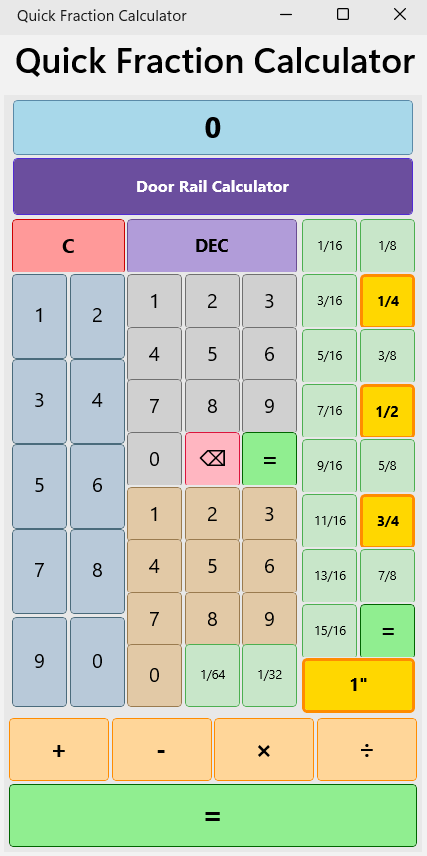
Shop fractions Sixteenths, thirty-seconds, and mixed numbers the way cabinetmakers think.
Two platforms One $20 license key for Windows and Android.
Door Rail Calculator Included on Windows — rail lengths from opening size and stile width.
Quick Fraction Calculator — fraction keys and Door Rail Calculator on Windows

What it does

A standalone utility for woodworkers who measure in fractions — not a general-purpose calculator with a fraction mode bolted on.

Fraction arithmetic

Add, subtract, multiply, and divide in shop-friendly fractional units without decimal drift.

Mixed numbers

Work in feet, inches, and fractions the way you mark a stick in the shop.

Door Rail Calculator

Windows bonus tool — rail cut lengths from opening width and stile width. Not on Android.

Phone or PC

Same license on your shop computer and your phone — one purchase, two places to use it.

Downloads by platform

Windows installer and Android APK from this website. Requirements below.

Windows

PC download

PlatformWindows 10 or 11, 64-bit
InstallerQuickFractionCalculator-Setup-1.0.exe
RuntimeInstaller adds .NET 10 Desktop Runtime if needed
Trial14 days — tap Continue to app
LicensePaste your Creem.io key from the receipt email
  1. Download and run the Windows installer below.
  2. Allow the one-time .NET Desktop Runtime install if prompted.
  3. Open from the Start menu — trial or license key on first launch.
Android

Phone & tablet

PlatformAndroid 8+ phone or tablet
DownloadQuickFractionCalculator-Android-1.0.apk from this site
Not fromGoogle Play — website edition only
Trial14 days — same license key as Windows
LicenseSame Creem.io key as your PC purchase
  1. Download the .apk from this page (see beginner guide below).
  2. Allow install from your browser or Files app if Android asks.
  3. Install, open, and tap Continue to app for the trial.
Beginner-proof

First time installing an app from a website?

Quick Fraction Calculator is not on Google Play — you download it directly from woodsolutions.com, the same way many independent shop apps are sold. These steps assume you have never sideloaded an app before.

  1. On your phone or tablet, open this page in Chrome (bookmark it — do not use random APK sites from a web search).
  2. Tap Download for Android when the APK is on this page — wait until the download finishes (Wi‑Fi helps on slower connections). Windows is available now.
  3. Open your downloads: pull down the notification and tap the file, or in Chrome tap (menu) → DownloadsQuickFractionCalculator-Android-1.0.apk.
  4. If Android asks to Allow install from this source, turn it on for Chrome or Files — this is a one-time permission for apps not from the Play Store.
  5. If Google Play Protect warns you, tap More detailsInstall anyway (only when you downloaded from this page).
  6. Tap Install, then Open. On the purple screen tap Continue to app to start your 14-day trial — no purchase needed yet.

Updates: When a new version is released, download again from this page and install over the old app — your trial and license stay on the device. Same license as PC: one Creem purchase covers Windows and Android (within your activation limit). Stuck? Email sales@woodsolutions.com.

Purchase & licensing

$20 one-time — one license for Windows and Android up to your activation limit. 14-day free trial first; no purchase needed to start.

Downloads stay on this website — never from Creem.io. Creem.io handles payment as our Merchant of Record and emails your license key after checkout.

Buy license — $20

FAQ

  • When can I download? Windows: now — use the download button above. Android: APK coming to this page. Questions: sales@woodsolutions.com.
  • Which Windows? Windows 10 or 11, 64-bit. Not Mac.
  • Which Android? Android 8+. Install only from this website — not Google Play.
  • How much? $20 one-time — no subscription. Windows and Android share the same key.
  • One purchase, two devices? Yes — one license key for PC and phone (see activation limit in your receipt).
  • Where do I download? Always from this page — not from Creem.io and not from APK mirror sites.
  • Why “Install unknown apps”? Android blocks non–Play Store installs by default. Allowing your browser or Files app once is normal for website downloads.
  • Play Protect says the app is harmful? Common for apps outside Google Play. If you downloaded from woodsolutions.com/calculator, tap More detailsInstall anyway. See the beginner guide.
  • SmartScreen (Windows)? More info → Run anyway if you trust this site.
  • New phone or PC? Re-download here and enter the same license key.

Questions or install help?

Windows download and Creem checkout are live. Android APK will appear on this page when ready. sales@woodsolutions.com

Email sales